


Tatasoft Disk Clone is a simple disk clone software for Windows that helps you copy your whole drive without reinstalling the system. It lets you move Windows, programs, and files to a new HDD or SSD in just a few steps. Whether you want to upgrade your disk, make a backup, or move data to another PC, Tatasoft Disk Clone gives you an easy way to do it while keeping your system bootable and safe.
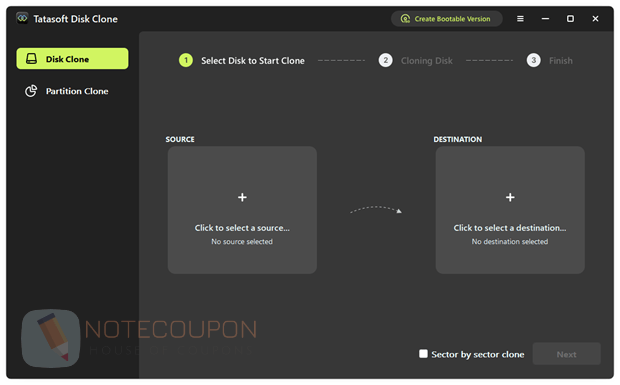
Features
- System disk cloning: clones your Windows system to a new disk without reinstalling the OS or apps.
- Sector-by-sector copy: creates a full 1:1 copy of a disk or partition, including all data and structure.
- Smart copy mode: copies only used data and allows cloning to a smaller disk if space is enough.
- Bootable clone support: ensures the cloned disk can start Windows normally after the process.
- HDD to SSD upgrade: moves your system to an SSD for better speed and performance.
- Partition cloning: copies a single partition with all files, folders, and settings.
- Flexible disk layout: lets you adjust partition size on the target disk after cloning.
- External device support: works with HDD, SSD, USB drives, SD cards, and memory cards.
- Portable system creation: allows you to run your Windows system from an external drive on another PC.
- WinPE bootable tool: creates a boot disk to clone or restore data even if your system cannot start.
- Safe cloning process: protects your source data even if the cloning is interrupted.
- Easy to use: simple steps make it suitable for both beginners and experienced users.
Tatasoft Disk Clone Giveaway Details
- Registration page: n/a
- License code:
RDTH8-8S821-4W5FM-X79HB-3AQL2 - Download page: TatasoftDiskClone.exe
- License details: lifetime
Terms and Conditions
- Lifetime license for Tatasoft Disk Clone
- Strictly non-commercial use
- No free technical support
- No free upgrades to future versions
- Register before Mar 27, 2026 GMT+0 08:00
Technical Details
- Publisher: Tatasoft
- Homepage: https://www.tatasoft.com/
- Version: 3.0
- Download size: 1/61MB
- Supports: Windows 11/10/8.1/8/7/Vista and Windows Server 2022/2019/2016/2012 R2/2012/2008 R2/2008/2003 R2/2003